STEP 01SELECT
Choose checks
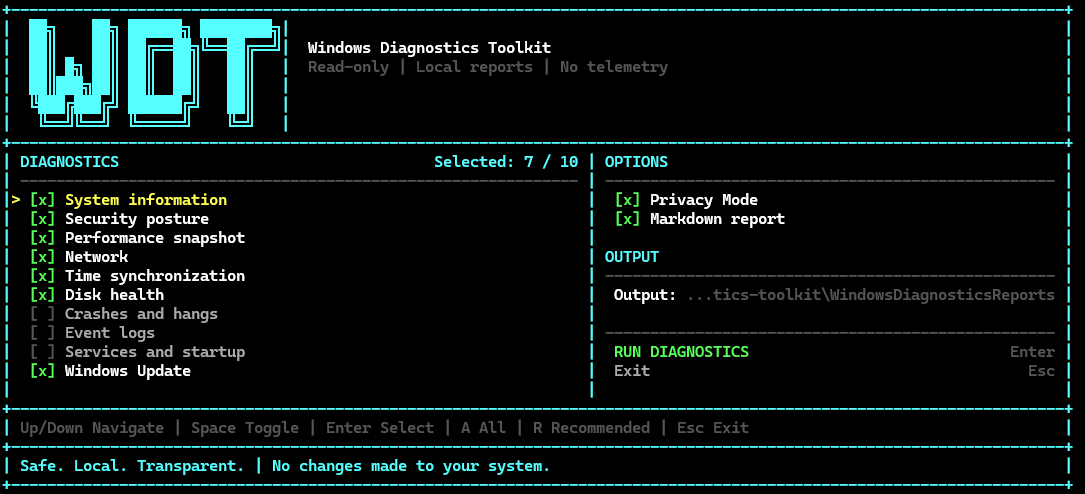
Toggle ten diagnostic areas, Privacy Mode, Markdown export and the output directory.
↑↓navigateSpacetoggle
SYSTEM READY
A read-only PowerShell diagnostics toolkit with a responsive terminal interface, local reports, Privacy Mode and no telemetry.
01 / INTERFACE
Run the entry point without switches. Select the diagnostic areas, choose report options and review the result without leaving the TUI.
Toggle ten diagnostic areas, Privacy Mode, Markdown export and the output directory.
↑↓navigateSpacetoggle
Only reviewed diagnostic operations are launched. The toolkit does not apply fixes or reconfigure Windows.
AallRrecommendedEnterrun
See elapsed time, report paths and aggregated WARN and ERROR counts before opening the report.
EntermenuEscexit

02 / QUICK START
No installer and no third-party PowerShell modules. The built-in Windows PowerShell 5.1 is enough.
PS> git clone https://github.com/0x0bug/windows-diagnostics-toolkit.git
PS> cd windows-diagnostics-toolkit
PS> .\Invoke-WindowsDiagnostics.ps103 / DIAGNOSTICS
Ten diagnostic modules are grouped here into six troubleshooting areas. Collect broad context or run only the module related to the problem; the findings summary appears before the detailed sections.
04 / PRIVACY
Reports stay in the selected output directory. Privacy Mode replaces common identifying values with stable per-report tokens.
ComputerName : <HOST-1>
UserName     : <USER-1>
IPv4Address  : <IP-1>
MacAddress   : <MAC-1>
DeviceId     : <ID-1>
[!] Process, application and dump-file names remain visible because they are diagnostically useful.
05 / GUIDES
Each guide explains which module to run, what evidence it collects, how to interpret the output and what the toolkit intentionally leaves untouched.
06 / FAQ
No. Production diagnostics collect and report state without applying automatic fixes, changing services, editing the registry or reconfiguring the network.
Automatic mode uses Unicode only for compatible interactive UTF-8 output. OEM encodings such as cp866, redirected output and unsupported hosts receive the printable ASCII fallback.
No. Resize events redraw the current interface and preserve the current selection. A running diagnostic operation is not restarted.
Reports are written to the selected output directory. Nothing is uploaded automatically.
No. WARN describes observed state that deserves review. A module execution failure is reported separately with a non-zero exit code.
READY / RUN
Open source, dependency-free and designed to produce evidence you can actually share.